
A Practical Guide for Plumbers, Roofers, and Other Service Businesses Serving Georgia Customers
Why Your Profile Matters
Picture a homeowner in Gwinnett County with a leaking water heater. She searches on her phone for a plumber, and a handful of businesses appear on a map with phone numbers, ratings, and photos. She calls one of them. She may never open a single website.
That map listing is your Google Business Profile: the free listing that controls how your business appears in Google Maps and Google Search. Google says creating a profile and listing your business on Google is free, and describes it as a way for customers to find you, see photos, read reviews, and in some cases book or request quotes.
Your website and your profile do different jobs, and you need both:
- Your profile helps nearby customers find you, judge you quickly, and contact you.
- Your website is where you explain your services in depth, show your work, and make it easy to ask for a quote.
If your real problem is that your website doesn’t appear on Google at all, start with Why Isn’t My Small Business Showing Up on Google? and come back here for the profile side.
Here is our own profile as a customer sees it. We’ll refer back to it throughout.
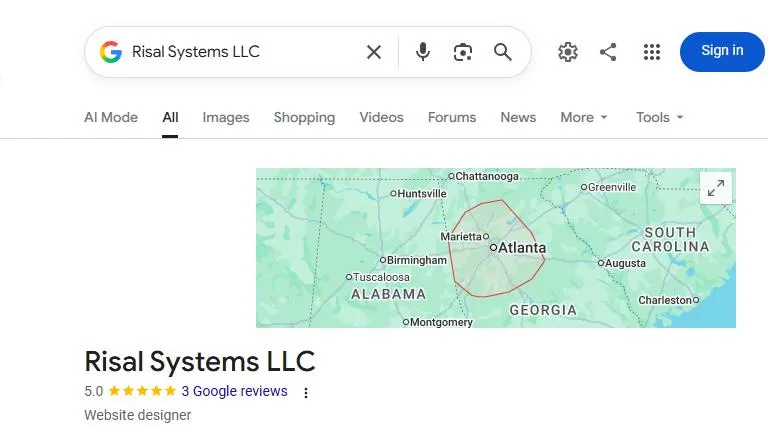
Our profile as a logged-out visitor sees it in Google Search, captured October 10, 2026.
Good to know: Google changes its rules and screens from time to time. We checked every Google rule in this guide against Google’s own help pages on October 10, 2026, and we link to them so you can confirm anything that matters for your business.
Step 1: Check for an Existing Profile
Before creating anything, search for your business name and phone number on Google and in Maps. You may find a profile you or a former employee already set up, or a listing Google created on its own.
Google’s guidelines say there should be only one profile per business, so don’t create a second one if a profile already exists. Use a business email address you control to manage it, not a personal inbox or an employee’s account, so you never lose access if someone leaves.
Step 2: Claim and Verify
When you claim or create the profile, Google asks you to verify that you run the business. Google decides which verification options appear for your business, and they can include:
- A code sent by phone call or text
- An email
- A live video call or a video recording
- A postcard mailed to your business address
- In some cases, instant verification through Google Search Console
Two timing details from Google’s own help page: once you complete the steps, Google’s review can take up to 5 business days, and a postcard code usually arrives within 14 days and expires after 30 days. Requesting a new code makes the earlier one invalid, so don’t request repeatedly. And while you wait, don’t create a duplicate profile.1
Step 3: Storefront or Service Area?
This choice matters most for plumbers, roofers, electricians, cleaners, and anyone who works at the customer’s location.
- Customers come to you. You have a storefront. Show your address.
- You travel to customers. Google allows a business with no storefront to have one service-area profile, and says service-area businesses should hide their address and list the areas they serve instead.
- Both. Google says a hybrid business with a staffed storefront can show its address and also set a service area.
Google says a service area shouldn’t extend farther than about two hours of driving time, though larger areas may be acceptable for some businesses.2
Our own profile shows an outline of our service area on the map instead of a street address.
Don’t use a fake address to look more local. Google’s guidelines say an address must be the real-world location, that P.O. boxes and mailboxes at remote locations aren’t acceptable, and that a virtual office isn’t eligible for a profile. Suite and floor numbers are fine.
Step 4: Fill Out Every Field
A complete profile gives customers fewer reasons to doubt you. Here is what to get right.
Business name. Google says your name should reflect your business’s real-world name. Names can’t include marketing taglines, hours, phone numbers, URLs, or descriptions of your location or services, and unnecessary information in a name can lead to suspension. That means “Joe’s Plumbing” is fine and “Joe’s Plumbing – Best Plumber in Atlanta – 24/7” is not.
Category. Google recommends using the fewest categories that describe your core business, and making them as specific as possible. A category should say what your business is (for example, “Roofing contractor”), not list services or amenities. The category shown on our profile is “Website designer.”
Hours. Keep them accurate, and update them when they change, including holiday closures. Wrong hours cost you calls and earn bad reviews.
Phone number and website. Use a number that gets answered. If you can’t pick up every call while you’re on a job, missed call text-back can reply to the caller automatically so the lead isn’t lost.
Services and description. List the services you actually offer and describe what makes your business different in plain language. Our description is a single sentence about who we help and how.
Tracking. If you use website analytics, you can add UTM tags to the website link on your profile so visits from your profile show up separately in your reports. That is a general analytics practice, not a Google Business Profile feature.
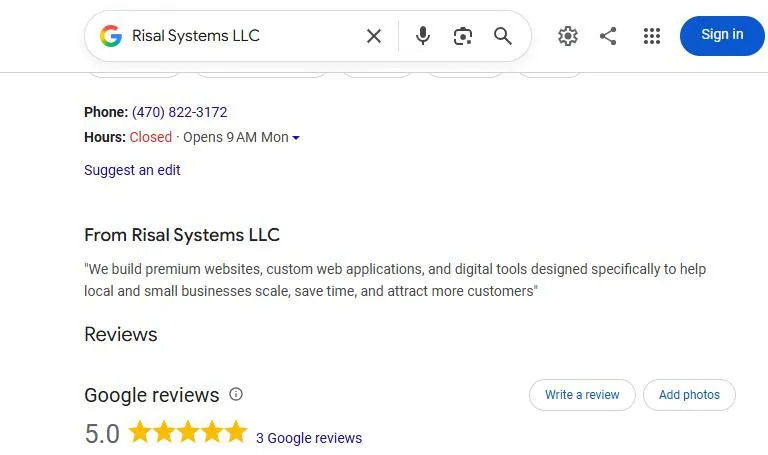
Contact details, hours, description, and reviews on our profile.
Our profile also uses the Products section to list our service packages:
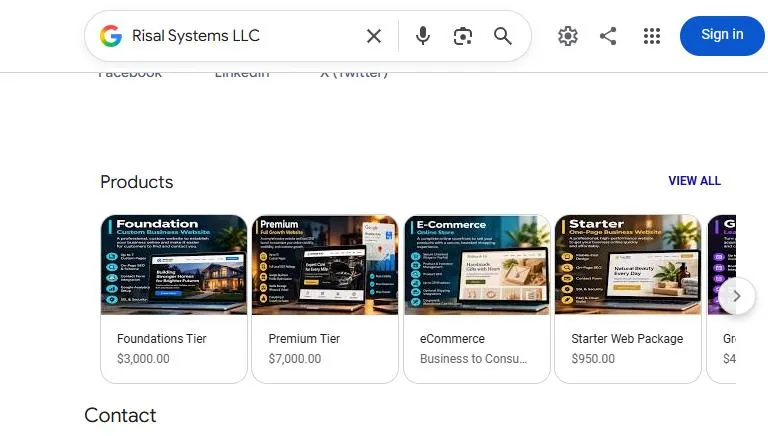
The Products section on our profile.
Step 5: Add Real Photos
Photos show customers who is about to arrive at their door. Our recommendation is real photos, not stock images: your team, your vehicle, and finished jobs. Avoid showing customers’ faces or house numbers unless they’ve agreed.
Step 6: Earn and Answer Reviews
Reviews are the part of your profile customers read most closely.
Asking. Google suggests asking customers to visit a Google link or scan a QR code to leave a review. Customers need a Google account to post one. The best moment to ask is right after a finished job, while the customer is satisfied. We recommend asking every customer, not only the ones you expect to be happy.3
What Google prohibits. Google doesn’t allow offering incentives, such as free or discounted goods or services, in exchange for reviews, for changing a review, or for removing a negative one. Reviews must reflect a genuine experience.
Replying. Google advises replies that are professional, polite, short, and specific to the review, and conversational rather than promotional. For negative reviews, Google’s advice includes protecting the reviewer’s privacy, avoiding personal attacks, apologizing where appropriate, and responding promptly. Reviews that break Google’s content policies can be reported.
A simple pattern for each:
- Positive review: thank the customer by name and mention the job in a sentence.
- Negative review: thank them for the feedback, apologize if something went wrong, and offer to sort it out by phone or email, without arguing or sharing private job details.
Future customers read your replies to bad reviews as closely as the reviews themselves.
Step 7: Keep It Current and Connected
Update it when things change. Hours, phone numbers, and services all go stale.
Posts. Google lets you publish three types of posts: updates, offers, and events. Google says posts older than six months are archived unless a date range is set. Google’s help page doesn’t say whether posts affect your ranking, so we don’t promise that they do.4
Match your website. Use the same business name, address, and phone number on your profile, your website, and the other directories that list you.5 Link to your website from your profile, and make sure the services you list on your profile match the service pages on your site. If you want search engines to read your business details clearly, add LocalBusiness structured data, which Google documents in its LocalBusiness structured data guide. We cover the basics in Technical SEO, Explained.
Link your social profiles. See Social Media Linking, Explained for connecting your website and social accounts consistently.
See it from the homeowner’s side. We reviewed 10 Metro Atlanta roofing websites the way a nervous homeowner would, including whether the name, address and phone number match across the site and Facebook. The results and a checklist are in Can a Homeowner Trust You Before They Call?
Common Mistakes
- Using a virtual office, P.O. box, or someone else’s storefront as your location
- Adding keywords, taglines, or hours to your business name
- Creating duplicate profiles for the same business
- Offering discounts or gifts for reviews
- Letting a former employee or agency stay as the only owner
- Letting hours and phone numbers go stale
If your profile is suspended, Google says to appeal through its appeals tool, and not to create a new profile for the same business while the appeal is under review. Google lists examples of evidence you can provide, such as business registration, a business license, tax certificates, and utility bills whose name and address match your profile. If you’re asked to upload evidence, Google says the evidence form must be submitted within 60 minutes.
If someone else already claimed your listing, you can request access. Google notifies the current owner, who has 3 days to respond. If they don’t, you may be able to claim it, though Google notes that isn’t always available.
The 30-Minute Setup Checklist
- Search for existing or duplicate listings
- Claim or create the profile using a business email you control
- Complete verification
- Choose storefront or service-area setup
- Use your real business name, with nothing added
- Pick a specific primary category
- Enter accurate hours, and update them when they change
- Add your services and a plain-language description
- Add a phone number that gets answered and your website
- Upload real photos of your team, vehicle, and finished work
- Send your review link to your last few customers, and reply to every review
- Match your name, address, and phone number on your website
Getting Started
If you’d like a second opinion on how your profile and website work together, reach out to Risal Systems and we’ll walk through it with you in plain language.
Google’s own guidance (the sources for the rules in this guide):
- Guidelines for representing your business on Google
- Verify your business
- Get reviews from customers
- Posts on your Business Profile
- Request ownership of a Business Profile
- Fix a suspended Business Profile
Related reading:
- Why Isn’t My Small Business Showing Up on Google?
- Technical SEO, Explained
- Social Media Linking, Explained
- Why Missed Call Text-Back Is the Highest-ROI Automation
- SEO, AEO, GEO, AIO & SXO, Explained
- SEO & AEO for Small Business: The Complete Resource Hub
- Local SEO Case Study: Duke’s Cleaning
- Common Website Mistakes Stopping Small Businesses From Growing
Notes
Footnotes
-
Google decides which verification methods are available for each profile, and the options can change. Google’s help page doesn’t say how long it takes to schedule a live video call, so we can’t give you a timeline for that method. ↩
-
Google describes the two-hour figure as a guideline, not a strict limit. ↩
-
Google’s help page on getting reviews doesn’t say whether asking only satisfied customers is allowed, so we can’t tell you what Google’s position is. We recommend asking everyone because honest, balanced reviews are what Google says helps customers. ↩
-
We are not aware of an official Google statement about posts and ranking. If you read claims that posting improves your ranking, check whether the source cites Google directly. ↩
-
Keeping this information identical everywhere is standard local-SEO practice and avoids confusing customers. The Google help pages we reviewed don’t state a ranking effect from consistency, so treat it as good housekeeping, not a guaranteed boost. ↩