
Content Architecture, Explained
A Small Business Owner’s Guide to Organizing a Website That Makes Sense
Why Content Architecture Matters
Every website is, underneath the design, a filing system. Pages have to live somewhere, relate to each other somehow, and be reachable in a reasonable number of clicks. Content architecture is the discipline of deciding that structure on purpose — instead of letting it happen by accident, one page at a time, until nobody (including you) remembers where anything is.
This is a close cousin of the site architecture we cover in Technical SEO, Explained, but it’s worth its own guide. Technical SEO’s version of “architecture” is mostly about whether search engines can crawl your structure efficiently. Content architecture is about whether the structure makes sense in the first place — for the visitor deciding whether to keep browsing, for you deciding where new content belongs, and for search engines trying to understand what your business actually does and how thoroughly you cover it.
Think of it this way: a library. A librarian doesn’t just need every book to be reachable — that’s the crawlability problem. She needs fiction separated from reference, mysteries grouped together, and a card catalog that makes sense to a stranger walking in for the first time. Content architecture is building that card catalog before you start shelving books, not after the shelves are already a mess.
Get this right early, and every new page you add makes the site stronger and easier to navigate. Get it wrong, and every new page makes things a little more confusing — for visitors, and for you.
The Eight Elements of Content Architecture
| Element | In Plain English | What We Do About It |
|---|---|---|
| Information Hierarchy | How content is layered from broad topics down to specific pages. | Map every page into a clear, logical hierarchy before anything gets built. |
| Navigation & Menus | Whether your menu actually reflects how visitors think and search. | Menus built around visitor intent, not internal org charts. |
| URL Structure | Whether a page's web address makes sense at a glance. | Clean, readable URLs that mirror the site's structure. |
| Content Siloing | Whether related content is grouped together or scattered. | Topics and services grouped into clear, self-contained sections. |
| Pillar & Cluster Model | One deep, authoritative page supported by smaller related pages. | A hub-and-spoke structure built around your core topics. |
| Internal Linking | Whether related pages actually link to each other. | Deliberate links connecting related content, not just menus. |
| Content Templates | Whether repeating page types are consistent or reinvented each time. | Reusable templates for service pages, locations, and posts. |
| Breadcrumbs | Whether visitors can tell where a page sits in your site. | A visible trail showing the path back to the main sections. |
1. Information Hierarchy
This is the backbone: which topics are broad umbrellas, and which are specific pages underneath them. A well-built hierarchy usually runs three levels deep at most — homepage, category, specific page — so nothing important is ever more than a couple of clicks away.
Think of it this way: an org chart for your content. Just like a company doesn’t work if every employee reports directly to the CEO with no middle management, a website doesn’t work if fifty unrelated pages all sit at the same level with nothing organizing them.
| Level | Service Business | E-commerce Store | Local Franchise |
|---|---|---|---|
| Level 1 (Homepage) | Plumbing Services Home | Online Apparel Store Home | Regional Dental Group Home |
| Level 2 (Pillar / Category) | /services/plumbing/ | /collections/mens-outerwear/ | /locations/springfield/ |
| Level 3 (Cluster / Page) | /services/plumbing/water-heater-repair/ | /products/waterproof-rain-jacket/ | /locations/springfield/emergency-dentistry/ |
2. Navigation & Menus
Your menu should reflect how a visitor thinks about your business, not how you think about your business internally. A visitor searching for “emergency repair” doesn’t care that, internally, that falls under “Residential Services > Plumbing > Repairs.” Good navigation translates your internal structure into the language and priorities of the person using it.
Think of it this way: store signage. Nobody wants to read a sign that says “Department 4B” — they want a sign that says “Bathroom Fixtures,” because that’s how they’re actually thinking about their trip.
3. URL Structure
A page’s web address should tell you roughly what’s on it and where it sits, just by reading it. A URL like /services/plumbing/water-heater-repair/ tells a visitor — and a search engine — exactly where they are. A URL like /page-id-4471/ tells nobody anything.
Think of it this way: a mailing address. “123 Main Street, Springfield” tells you where you’re going before you arrive. A string of random numbers doesn’t, even if it technically leads to the same place.
4. Content Siloing
Siloing means grouping related content together into clear sections, rather than letting similar topics scatter across unrelated parts of the site. A plumbing company writing about water heaters, leak repair, and pipe installation should have those living in the same neighborhood of the site — not scattered between the blog, a random landing page, and the services menu with no connection between them.
Think of it this way: departments in a well-run store. Everything related to painting lives in one aisle, not spread across six different corners of the building for a customer to hunt down.
5. The Pillar & Cluster Model
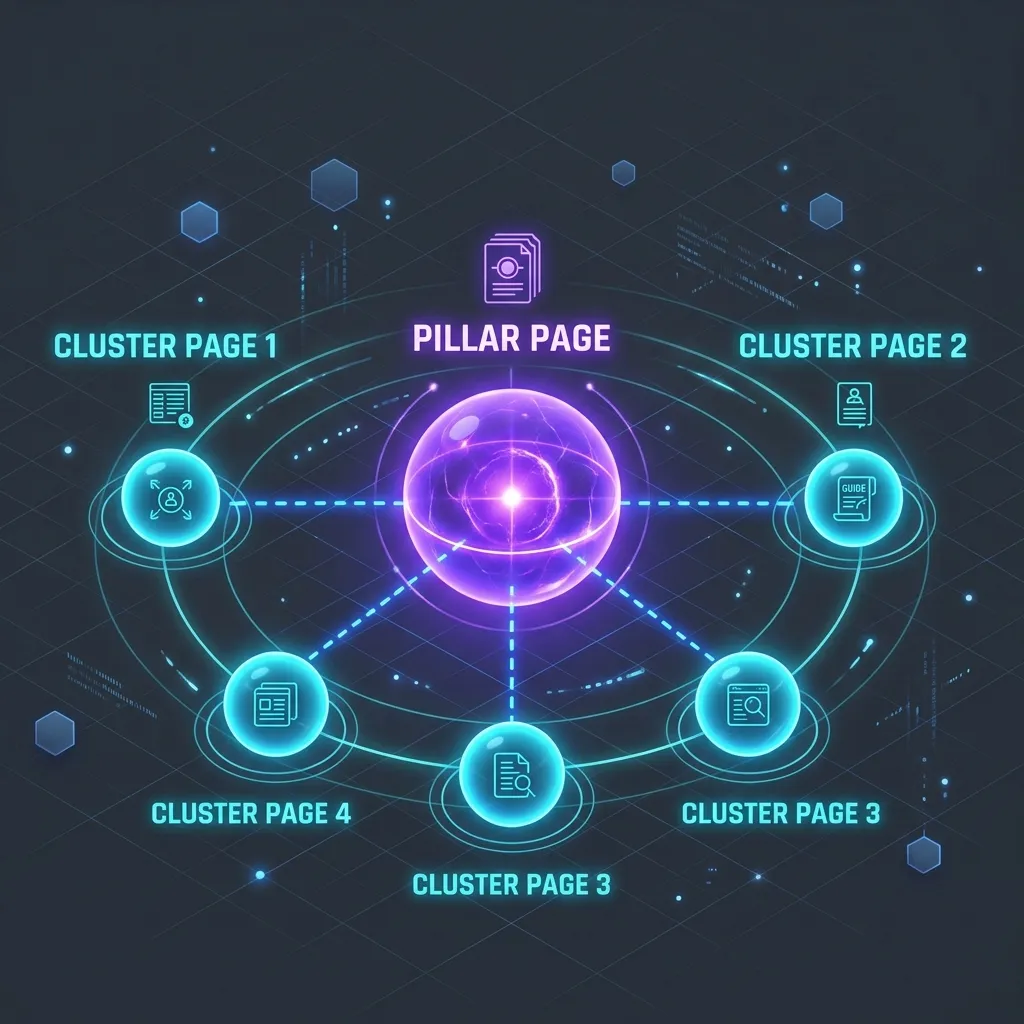
This is one of the most effective structures for topic authority: one comprehensive “pillar” page covering a broad topic thoroughly, surrounded by smaller “cluster” pages that each go deep on one piece of it — all linking back to the pillar, and to each other where it makes sense.
Think of it this way: a hub-and-spoke wheel, or a library’s reference desk. The pillar page is the reference desk — broad, welcoming, a good starting point for anyone. The cluster pages are the specific shelves the desk points you toward once your question gets more specific.
6. Internal Linking
Menus get a visitor to a section. Internal links get them to the next relevant thing once they’re already reading. A page about water heater repair should naturally link to a page about water heater installation, or maintenance tips — giving an interested visitor somewhere to go next, and giving search engines a clearer picture of how your content relates. This same principle extended out to your social profiles is what we cover in Social Media Linking, Explained.
Think of it this way: hallways between rooms in a well-designed building, so you’re not forced back out to the main lobby every time you want to move to the room next door.
7. Content Templates
If you offer twelve services, all twelve service pages should follow a consistent, predictable structure — not twelve different layouts built ad hoc over the years. Templates make the site easier to navigate, easier to maintain, and easier to expand.
Think of it this way: a blueprint for a room type. A hotel doesn’t design every room from scratch — it designs one great room layout, then repeats it reliably, floor after floor.
8. Breadcrumbs
Breadcrumbs are the small trail of links, usually near the top of a page, showing the path back through the hierarchy — Home > Services > Plumbing > Water Heater Repair. They’re a small detail, but they orient a visitor instantly and reinforce the hierarchy you’ve built everywhere else.
Think of it this way: the “You Are Here” marker on a mall directory — small, easy to overlook, and quietly essential the moment someone feels lost.
A Worked Example
Structure is easiest to see side by side. Here’s a simplified before-and-after for a fictional local plumbing company — the kind of business that tends to accumulate pages faster than structure.
Before: Pages Added As They Came Up
Home
About
Water Heater Repair
Blog
Pipe Installation
Contact
Emergency Services
Leak Detection Tips (blog post)
Drain Cleaning
Service Area — Springfield
Nothing here is technically broken — every page loads, every link works. But there’s no hierarchy. Services, locations, and blog content are all mixed together at the same level, with no clear starting point for someone who isn’t sure exactly what they need.
After: Organized Around Visitor Intent
Home
Services  (pillar page)
   Water Heater Repair
   Pipe Installation
   Drain Cleaning
   Emergency Services
Service Areas  (pillar page)
   Springfield
   [Additional towns as the business grows]
Resources  (blog, grouped by topic)
   Leak Detection Tips
About
Contact
Same content, organized on purpose. Now there are two clear pillar sections — Services and Service Areas — each supported by clusters underneath, a dedicated home for blog content, and a hierarchy that’s obvious to both a first-time visitor and a search engine. Adding a ninth service or a third town later is simple: it slots into an existing category instead of becoming one more loose page.
Common Mistakes We See
- Menus organized around internal department names instead of how customers actually search.
- Blog posts and service pages covering the same topic with no links between them.
- Location or service pages that are all technically live, but three or four clicks deep with nothing pointing to them.
- No consistent template, so every new service page looks and reads a little differently.
- A flat structure where fifty-plus pages all sit at the same level, with no grouping at all.
Our Process at Risal Systems
Content architecture work is part planning, part cleanup. Here’s how we approach it.
Step 1 — Audit
- We map every existing page and how it currently connects — or doesn’t — to the rest of the site.
- We identify orphaned pages, duplicate topics, and structural dead ends.
Step 2 — Design the Hierarchy
- We build the pillar-and-cluster structure around your actual services and locations, based on how customers search — not how the business is organized internally.
Step 3 — Restructure
- We rebuild navigation, URLs, and internal links to match the new structure, and set up templates for repeating page types.
Step 4 — Maintain
- As new services, locations, or blog posts get added, we slot them into the existing structure instead of letting the site drift back into a loose collection of pages.
The result is a site that can keep growing for years without needing to be reorganized from scratch every time.
What This Means for Your Business
Content architecture is largely invisible to a happy visitor — which is exactly the point. When it’s working, people find what they need without thinking about how. For a small business, that translates into:
- Visitors who find one relevant page and naturally discover two or three more, instead of leaving after the first.
- A site that’s simple to expand — a new service or location has an obvious home instead of becoming a loose page.
- Search engines that better understand the full scope of what you offer, because related content is clearly grouped and linked.
- Less time spent, months or years from now, trying to remember where something lives or untangling a site that’s grown without a plan.
Getting Started
If your site has grown organically over the years — a page added here, a blog post added there — there’s a good chance the structure could use a second look. A short architecture review will show you exactly how your content is currently organized, and what a clearer version could look like.
Reach out to Risal Systems and we’ll map it out with you in plain language, step by step.
Related reading: